

Searching the Financial Service Providers Register
Your search options and the information we hold about financial service providers
You can search the FSPR to identify financial service providers (FSPs) and find information about them. For example, which services they are registered for and, if applicable, are licensed to provide.
In this guide:
How to search
Enter any of the following details in the search field to search for an FSP.
- Name
Their current or previous name, trading name or alias. - Registration number
Their FSP number or (if applicable) their New Zealand Business Number (NZBN).
Advanced search options
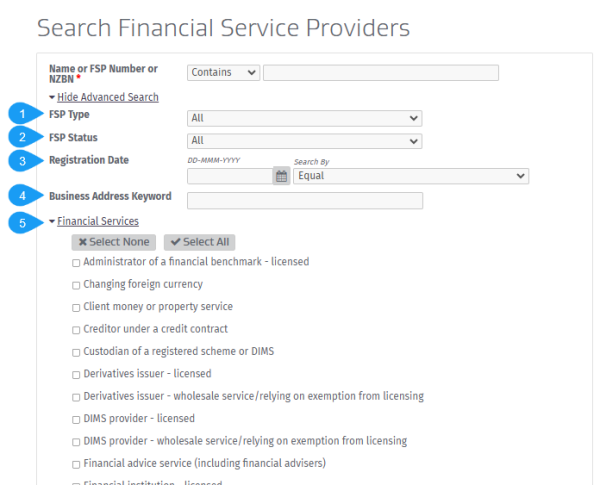
You can use the advanced search to find specific results for:
- Types of FSPs
For example search only for individuals or only for entities, such as companies. - The status of an FSP
For example search only for FSPs that are registered or that have been suspended or deregistered. - FSPs registered on certain dates (or between 2 specific dates).
- Keywords within a business address
For example you can search by a street name or a city. - Financial services that FSPs are registered to provide.
When you select this option, choose from the list of possible services.
You can combine different fields to narrow down your results.
 Search for a financial service provider
External link
Search for a financial service provider
External link
Information available to you
Once you have found the FSP you are looking for, you can view their details including:
- General details
- Registration date and current status
- Trading name and former trading name, if any
- Other names an individual FSP is known by
- Addresses
- Business address
- Financial services
- Services the FSP is registered and, if applicable, licensed to provide
- The dispute resolution scheme(s) the FSP belongs to, if any (see below for more details)
- The Financial Advice Provider a financial adviser is engaged by and vice versa, if applicable.
Searching for dispute resolution schemes
If an FSP offers financial services to retail clients (for example, a financial adviser) they must belong to an approved dispute resolution scheme (DRS).
You can find out which scheme they belong to when you search this register.
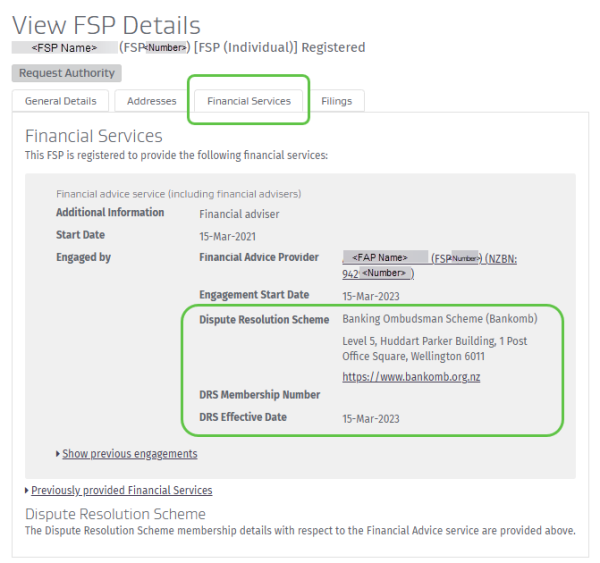
- Once you have found the FSP, select their name to view their full details.
- Select the ‘Financial Services’ tab and see details of:
- each financial service the FSP is registered to provide, and
- which dispute resolution scheme(s) they belong to (including the address of the DRS and a link to their website).
Saving your search results
You can save up to 1,000 search results by exporting them in an Excel file format. For each search you complete the file includes the search criteria you used and contains a list of FSPs showing their:
- FSP Name
- Registration number
- NZBN (if applicable)
- Registration status
- Registration date
- Deregistration date (if applicable).
If your search returns more than 1,000 results, try refining your search.
If your search still returns over 1,000 results you can you can request access to our bulk data to do your own filtering or analysis. Bulk data is a monthly snapshot of most of the publicly available information on the Financial Service Providers Register. These files are provided in JSON format.
Request access to bulk data
Data Services — Companies Office
Other guides in
Getting started on the register
- Preparing to register as a financial service provider
- Setting up your online services account
- Using your online services account dashboard
- Confirming your authority to update information
- Keeping financial service provider (FSP) details up to date